
Introduction
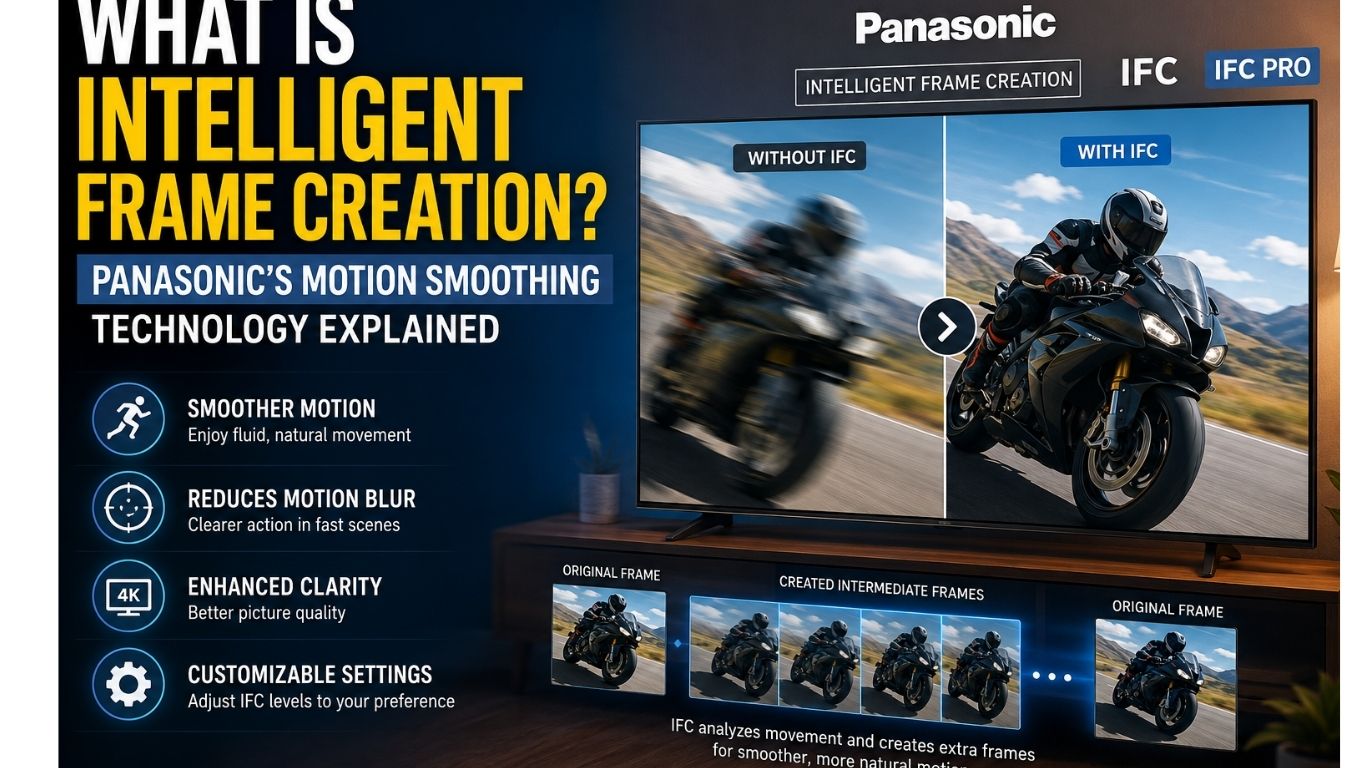
When watching sports, action movies, or fast-moving scenes, you may notice that motion sometimes looks blurry or choppy. To solve this problem, Panasonic developed a motion enhancement technology called Intelligent Frame Creation (IFC). This feature uses advanced motion interpolation to create additional frames between the original video frames, making movement appear smoother and more natural.
Modern Panasonic TVs analyze object movement in real time using intelligent image processing. Instead of simply repeating existing frames, the television predicts where moving objects will appear next and generates new frames accordingly. This improves motion clarity, reduces blur, and delivers a more enjoyable viewing experience.
Whether you’re watching football, Formula 1, wildlife documentaries, or live television, Intelligent Frame Creation helps produce smoother visuals without requiring higher-frame-rate source content. However, like any picture enhancement feature, it also has advantages and disadvantages depending on the type of content you watch.

What Is Intelligent Frame Creation (IFC)?
Intelligent Frame Creation (IFC) is Panasonic’s proprietary motion smoothing technology designed to improve picture quality during fast-moving scenes. The technology works by analyzing consecutive video frames and creating new artificial frames between them. This process is known as motion interpolation.
Instead of displaying only the original frames from a movie or TV broadcast, Panasonic’s processor calculates how objects move across the screen. It then predicts intermediate positions and inserts extra frames to create smoother motion.
For example, if a football moves quickly across the screen, IFC predicts where the ball should appear between two original frames and generates additional images. As a result, motion looks more fluid while reducing blur and visible stuttering.
Unlike older televisions that simply duplicated frames, modern Panasonic TVs perform advanced motion analysis, pixel tracking, and image processing to improve overall motion quality.
Why Panasonic Uses Intelligent Frame Creation
Today’s televisions support much higher refresh rates than older displays. While many movies are still recorded at 24 frames per second (24fps) and television broadcasts commonly use 30fps, modern TVs often refresh at 60Hz, 120Hz, or even higher.
Without additional processing, this difference can create motion judder during camera pans and fast action scenes.
Panasonic developed Intelligent Frame Creation to bridge this gap.
By intelligently creating intermediate frames, the TV makes motion appear smoother while maintaining better picture clarity during:
- Live sports
- Racing events
- Wildlife documentaries
- Action movies
- Television broadcasts
Many viewers appreciate the smoother experience, while movie enthusiasts often adjust or disable the feature to preserve the original cinematic look.
How Intelligent Frame Creation Works
Intelligent Frame Creation relies on several advanced image-processing technologies working together.
The television continuously compares one frame with the next. It studies object position, direction, and movement speed before calculating where each object should appear in between those frames.
After completing these calculations, Panasonic inserts newly generated frames into the video sequence. This creates smoother transitions without requiring the original content to be recorded at a higher frame rate.
The process happens thousands of times every second using Panasonic’s built-in video processor.
Motion Interpolation
Motion interpolation is the core technology behind Intelligent Frame Creation.
Rather than simply displaying the original video frames, the TV predicts the movement between two frames and creates additional images to fill the gaps.
This helps reduce:
- Motion blur
- Screen judder
- Choppy camera movement
- Fast-action stuttering
The result is much smoother playback during sports, action scenes, and live broadcasts.
Motion Estimation
Motion estimation is the process of identifying how every object moves between consecutive frames.
The TV analyzes:
- Object direction
- Speed
- Distance
- Pixel movement
Using this information, Panasonic accurately predicts where each moving object should appear in the next frame.
This improves motion accuracy while reducing visual artifacts.
Motion Vector Analysis
Motion vector analysis tells the television exactly how different objects move across the display.
Each moving object receives its own motion vector, allowing Panasonic’s processor to generate realistic intermediate frames.
This advanced analysis helps maintain smoother movement even during complex scenes involving multiple moving subjects.
Frame Rate Conversion
Another important part of Intelligent Frame Creation is frame rate conversion.
For example:
| Original Content | Display Output |
|---|---|
| 24fps Movie | Smooth playback using frame interpolation |
| 30fps TV Show | Converted toward smoother motion |
| 60fps Sports | Enhanced motion stability |
By increasing the effective frame rate through intelligent processing, Panasonic televisions produce cleaner and more comfortable motion for viewers.

Intelligent Frame Creation vs IFC Pro: What’s the Difference?
Although Panasonic includes Intelligent Frame Creation (IFC) in many of its televisions, not every version offers the same level of performance. Standard IFC is available on entry-level and mid-range models, while IFC Pro is designed for premium Panasonic TVs with more powerful processors.
Both technologies use motion interpolation to improve smoothness, but IFC Pro performs more advanced calculations, resulting in cleaner motion, fewer visual artifacts, and more natural-looking movement during fast scenes. According to the source material, premium models may also include AI-assisted frame interpolation on selected televisions.
Standard IFC
Standard Intelligent Frame Creation is designed for everyday television viewing.
It analyzes motion between frames and inserts additional images to reduce blur and improve smoothness. This version performs well for:
- Daily TV shows
- News channels
- Sports broadcasts
- Casual movie watching
For most users, standard IFC provides a noticeable improvement without requiring expensive hardware.
What Makes IFC Pro Better?
IFC Pro uses a faster and more advanced image processor.
Compared to standard IFC, it performs more accurate motion estimation, better object tracking, and higher-precision frame generation. This results in smoother motion while reducing unwanted ghosting and image distortion.
Premium Panasonic TVs equipped with IFC Pro can maintain more natural movement even during complex action scenes.
Some high-end models also use AI-assisted processing to improve object recognition before generating new frames.
Feature Comparison
| Feature | Standard IFC | IFC Pro |
|---|---|---|
| Motion Processing | Standard | Advanced |
| Motion Estimation | Good | Excellent |
| Motion Accuracy | Good | Higher Precision |
| Motion Blur Reduction | Good | Excellent |
| Video Processing Speed | Good | Faster |
| Frame Generation | Standard | Advanced |
| AI Assistance | No | Available on Selected Models |
| Best For | Everyday Viewing | Premium Home Theater |
Which One Should You Choose?
The right option depends on how you use your television.
If you mainly watch TV shows, news, YouTube, and occasional sports, standard IFC is more than enough. It delivers smoother motion while keeping the picture natural.
If you enjoy blockbuster movies, 4K Blu-ray content, or live sports on a premium Panasonic OLED TV, IFC Pro offers a more refined experience thanks to its stronger processing capabilities.

Benefits of Intelligent Frame Creation
1. Smoother Motion
The biggest advantage of Intelligent Frame Creation is smoother movement.
Instead of showing noticeable jumps between frames, Panasonic generates additional images that create fluid transitions.
This is especially useful when watching:
- Football
- Cricket
- Formula 1
- Tennis
- Basketball
- Action movies
2. Reduces Motion Blur
Fast-moving objects often become blurry on televisions.
Intelligent Frame Creation minimizes motion blur by predicting object movement and creating extra frames between the originals.
This makes players, racing cars, and moving objects easier to follow.
3. Better Sports Experience
Sports contain constant movement.
Football passes, cricket shots, racing cars, and tennis rallies happen in fractions of a second.
IFC helps maintain sharp movement while making camera pans appear much smoother.
4. Improved Live TV Viewing
Live television often contains fast camera movement.
With Intelligent Frame Creation enabled, news broadcasts, concerts, documentaries, and reality shows appear more fluid and stable.
5. Better Viewing on Modern 4K TVs
Modern Panasonic OLED TVs feature high refresh-rate displays.
IFC works alongside these displays to produce smoother movement while maintaining impressive picture clarity.
Large landscape shots and aerial scenes benefit from improved visual stability.
Drawbacks of Intelligent Frame Creation
Despite its advantages, Intelligent Frame Creation is not perfect.
Like any motion enhancement technology, it has a few disadvantages that some viewers may notice.
Soap Opera Effect
The most common complaint is the Soap Opera Effect.
Most Hollywood movies are filmed at 24 frames per second, creating the classic cinematic look.
When IFC adds extra frames, movies begin to resemble television dramas or studio recordings instead of traditional films.
Many movie enthusiasts disable IFC for this reason.
Motion Artifacts
No prediction system is perfect.
During extremely complicated scenes involving explosions, crowds, or rapid camera movement, the television may occasionally create incorrect frames.
This can produce:
- Ghosting
- Distorted edges
- Temporary image artifacts
Fortunately, newer Panasonic processors greatly reduce these issues.
Increased Input Lag
Creating extra frames requires additional processing time.
As a result, Intelligent Frame Creation slightly increases input lag.
While this is rarely noticeable during movies or TV shows, competitive gamers usually prefer to disable IFC and enable Game Mode for faster controller response.
When Should You Turn Intelligent Frame Creation On or Off?
Not every type of content benefits from the same picture settings. Intelligent Frame Creation (IFC) can significantly improve motion in fast-moving scenes, but it may also change the original appearance of movies. Choosing the right setting depends on what you are watching. According to the source article, sports, live television, and wildlife documentaries benefit the most from IFC, while movies and gaming often perform better with the feature disabled.
When Should You Turn IFC On?
Sports
Sports involve constant movement and rapid camera pans.
Whether you’re watching football, cricket, basketball, Formula 1, or tennis, Intelligent Frame Creation makes players and fast-moving objects appear smoother and easier to follow.
The technology reduces motion blur and improves overall picture clarity.
Wildlife Documentaries
Nature documentaries often include birds in flight, running animals, and fast-moving scenes.
IFC helps maintain natural motion while making these scenes clearer and more enjoyable.
Live Television
News programs, concerts, reality shows, and live broadcasts also benefit from smoother motion.
Camera movements appear more stable, creating a comfortable viewing experience.
Fast Action Movies
Some viewers prefer enabling IFC while watching action films because explosions, chase scenes, and rapid movement appear much smoother.
However, this comes down to personal preference.
When Should You Turn IFC Off?
Hollywood Movies
Most Hollywood films are recorded at 24fps to create a traditional cinematic look.
When Intelligent Frame Creation adds extra frames, movies may begin to look overly smooth.
This visual effect is commonly known as the Soap Opera Effect.
If you prefer the director’s original vision, turning IFC Off is usually the best choice.
Gaming
Competitive gaming requires the fastest possible response.
Because IFC creates additional frames before displaying them, it increases input lag.
For PlayStation, Xbox, and PC gaming, Panasonic recommends enabling Game Mode, which automatically disables most image processing features.
Recommended IFC Settings
| Content Type | Recommended Setting | Reason |
|---|---|---|
| Hollywood Movies | Off | Preserves the original cinematic look |
| Sports | Medium | Smooth motion with natural appearance |
| Live TV | Low or Medium | Better motion without excessive smoothing |
| Wildlife Documentaries | Medium | Improves fast-moving scenes |
| Casual Gaming | Off or Low | Reduces input lag |
| Competitive Gaming | Game Mode | Fastest controller response |
| News & TV Shows | Low | Natural-looking picture |
How to Adjust Intelligent Frame Creation Settings on Panasonic TVs
Changing IFC settings is simple on most Panasonic televisions.
Although menu layouts may differ slightly depending on the TV model, the overall process remains almost the same.
Step 1
Press the Home or Menu button on your Panasonic remote.
Step 2
Open Settings.
Step 3
Select Picture Settings.
Step 4
Go to Advanced Picture Settings.
Step 5
Locate Intelligent Frame Creation (IFC).
Step 6
Choose your preferred setting:
- Off
- Low
- Medium
- High
- Maximum (Available on some models)
Understanding Every IFC Level
Each level changes how aggressively Panasonic performs motion interpolation.
Off
Displays the original video exactly as it was recorded.
Best for:
- Movies
- Blu-ray films
- Cinema lovers
Low
Applies only a small amount of motion smoothing.
This reduces judder while keeping the picture looking natural.
Best for:
- TV shows
- News
- Everyday viewing
Medium
Provides an excellent balance between smoothness and realism.
This is the most recommended setting for sports.
High
Produces very smooth movement by creating additional frames more aggressively.
Some viewers enjoy this for sports, while others may notice the Soap Opera Effect.
Maximum
Offers the strongest level of motion smoothing.
Not everyone prefers this setting because movies can appear unnatural.
Common IFC Levels
| Setting | Motion Appearance | Best For |
|---|---|---|
| Off | Original cinematic look | Movies |
| Low | Gentle smoothing | TV Shows |
| Medium | Balanced motion | Sports |
| High | Very smooth | Fast action |
| Maximum | Strongest smoothing | Personal preference |
Panasonic Intelligent Frame Creation vs Other Motion Smoothing Technologies
Every major television manufacturer has developed its own motion enhancement technology. While the goal is the same—to make fast-moving scenes appear smoother—each brand uses different image-processing algorithms and motion interpolation techniques. Panasonic’s Intelligent Frame Creation (IFC) is designed to produce natural-looking motion while minimizing unwanted visual artifacts. According to the source article, Panasonic takes a more balanced approach than some competitors, making it suitable for both movies and sports.
Panasonic Intelligent Frame Creation
Panasonic’s Intelligent Frame Creation focuses on improving motion without making the picture appear excessively artificial.
Using advanced motion estimation and frame generation, the television inserts additional frames between the originals to reduce blur and judder while maintaining realistic movement.
This balanced approach makes IFC a popular choice for viewers who enjoy both sports and movies.
Samsung Auto Motion Plus
Samsung uses Auto Motion Plus as its motion enhancement technology.
Compared to Panasonic, Samsung generally applies stronger motion smoothing. This makes sports and fast action appear extremely smooth, although some users may notice a stronger Soap Opera Effect during movies.
Sony MotionFlow
Sony’s MotionFlow is designed to maintain smooth motion while preserving a natural cinematic appearance.
Many movie lovers appreciate Sony’s balanced processing because it reduces motion blur without making films look overly artificial.
LG TruMotion
LG offers TruMotion, which improves motion clarity by generating additional frames.
Users can usually customize the level of motion smoothing according to their preferences, making TruMotion suitable for different types of content.
Motion Technology Comparison
| TV Brand | Motion Technology | Motion Style | Best For |
|---|---|---|---|
| Panasonic | Intelligent Frame Creation | Balanced | Movies & Sports |
| Samsung | Auto Motion Plus | Aggressive | Sports |
| Sony | MotionFlow | Natural | Mixed Content |
| LG | TruMotion | Smooth | Fast Motion |
| Hisense | Smooth Motion | Moderate | Daily TV |
| TCL | Motion Clarity | Balanced | Streaming |
Which Motion Technology Is Best?
There is no single winner because every viewer has different preferences.
If you mainly watch sports, stronger motion smoothing may provide the smoothest experience.
If you prefer Hollywood movies, lighter motion processing usually preserves the original cinematic appearance.
Fortunately, modern televisions allow users to customize motion settings, making it easy to choose the balance that best matches personal viewing habits.

Common Intelligent Frame Creation Problems and Fixes
Although Intelligent Frame Creation performs very well, users may occasionally experience a few common issues. Most of these problems can be solved simply by adjusting picture settings.
Soap Opera Effect
Cause
Motion smoothing creates additional frames, making movies appear too smooth.
Solution
Reduce IFC to Low or turn it Off while watching movies.
Motion Blur
Cause
Motion settings may not be properly adjusted for fast-moving content.
Solution
Increase IFC slightly to improve motion clarity.
Ghosting
Cause
The TV struggles to predict complicated movement.
Solution
Lower the IFC level from High to Medium.
Motion Artifacts
Cause
Complex scenes with explosions, crowds, or rapid camera movement.
Solution
Use Medium instead of High for more natural processing.
Input Lag
Cause
Additional frame generation increases processing time.
Solution
Enable Game Mode while gaming.
IFC Option Missing
Cause
Some Picture Modes disable certain settings.
Solution
Switch to another Picture Mode or update the TV firmware if the option is unavailable.
Common Problems and Solutions
| Problem | Possible Cause | Recommended Fix |
|---|---|---|
| Soap Opera Effect | High IFC level | Set IFC to Low or Off |
| Motion Blur | Incorrect motion settings | Increase IFC slightly |
| Ghosting | Difficult motion prediction | Lower IFC to Medium |
| Motion Artifacts | Complex scenes | Use Medium setting |
| Input Lag | Extra image processing | Enable Game Mode |
| IFC Option Missing | Picture mode limitation | Change Picture Mode or update firmware |
Key Takeaways
- Intelligent Frame Creation improves motion by creating additional frames between the original video frames.
- It works best for sports, live TV, documentaries, and other fast-moving content.
- Movie lovers often prefer turning IFC Off to preserve the original cinematic experience.
- Competitive gamers should use Game Mode for the lowest possible input lag.
- Experimenting with different IFC levels helps you find the ideal balance between smoothness and realism.
Frequently Asked Questions (FAQs)
1. What is Intelligent Frame Creation on a Panasonic TV?
Intelligent Frame Creation (IFC) is Panasonic’s motion enhancement technology that creates additional frames between the original video frames. It improves motion clarity, reduces motion blur, and delivers smoother movement during sports, documentaries, and live television. The system uses advanced motion estimation, motion vector analysis, and video processing to predict object movement in real time.
2. Does Intelligent Frame Creation improve picture quality?
Yes. Intelligent Frame Creation improves picture quality during fast-moving scenes by reducing motion blur and making movement appear smoother. Sports events, racing, and wildlife documentaries often look clearer with IFC enabled. However, some viewers may prefer turning it off for movies to preserve the original cinematic appearance.
3. Does Intelligent Frame Creation increase input lag?
Yes. Because the television creates additional frames before displaying the image, IFC introduces a small amount of input lag. While this is usually unnoticeable during movies or TV shows, competitive gamers should enable Game Mode for the fastest response time.
4. Should I leave Intelligent Frame Creation on all the time?
Not necessarily. The best setting depends on the type of content you watch. Sports, live TV, and documentaries usually benefit from IFC, while many movie enthusiasts prefer turning it off to maintain the original cinematic look.
5. Does Intelligent Frame Creation work with 4K content?
Yes. Intelligent Frame Creation works with compatible 4K Panasonic televisions. Premium models with more powerful processors provide smoother playback while maintaining excellent image quality.
6. What is the difference between IFC and IFC Pro?
Standard IFC provides motion enhancement for everyday viewing, while IFC Pro includes more advanced motion estimation, faster processing, improved motion vector accuracy, and AI-assisted frame interpolation on selected premium models.
7. Is Intelligent Frame Creation good for watching sports?
Yes. Sports are one of the best uses for Intelligent Frame Creation. It makes football, cricket, tennis, basketball, and Formula 1 races appear smoother by reducing motion blur and improving movement during fast action.
8. Why do movies sometimes look unnatural with IFC enabled?
This happens because Intelligent Frame Creation adds extra frames, creating a very smooth image. Many viewers refer to this as the Soap Opera Effect, which changes the traditional cinematic appearance of movies.
9. How can I reduce the Soap Opera Effect?
Open your Panasonic TV’s Picture Settings and lower the IFC level or turn it Off. This restores the original frame rate and preserves the cinematic look intended by filmmakers.
10. Which IFC setting is best?
There is no single best setting for everyone.
- Off – Movies
- Low – TV Shows
- Medium – Sports & Live TV
- High – Fast Action
- Game Mode – Gaming
The ideal setting depends on your viewing preferences.
Conclusion
Intelligent Frame Creation is one of Panasonic’s most valuable picture enhancement technologies. By using advanced motion interpolation, motion estimation, and intelligent video processing, it creates smoother motion, reduces blur, and improves the viewing experience during sports, live television, documentaries, and other fast-moving content. Modern Panasonic TVs analyze object movement in real time, generating additional frames that make action appear more fluid and visually comfortable.
However, no single picture setting is perfect for every type of content. While sports fans often enjoy the extra smoothness provided by IFC, movie enthusiasts may prefer disabling the feature to preserve the original cinematic experience and avoid the Soap Opera Effect. Gamers can achieve the best performance by switching to Game Mode, which minimizes input lag for faster controller response. By experimenting with the available IFC levels, you can find the perfect balance between motion clarity and natural image quality for every viewing situation.
Leave a Reply